
01. Process & Design
Behind
RedStack
Fast discovery, a design system built from scratch, and how a “command centre” aesthetic was made accessible to new learners without alienating security professionals.
02. Discovery
Align fast, validate early
The project had a tight timeline with no prior design foundation to build on. Discovery was structured to move quickly – expert interviews to understand the domain, goal identification to surface non-negotiable requirements, and rapid prototype validation before any development investment.
01. Expert & stakeholder interviews
Security & DevOps users
02. Goal & need identification
3 critical requirements
03. Rapid prototype build & test
Layouts + flows
04. Stakeholder validation loops
Assumptions confirmed
Four critical user needs surfaced
Data analysis revealed four compounding failure points in the onboarding funnel. Each was addressed in sequence – fixing upstream problems first so downstream metrics would follow.
01. Accessible learning paths
Users needed a structured, progressive curriculum where a new learner could find an entry point and an expert could jump directly to advanced content - without the same navigation serving both poorly.
02. Clear certification flows
Certification is a primary motivation for both audiences — but for different reasons. The UX needed to make progress toward certification visible, measurable, and achievable from day one.
03. Reliable tools for ongoing training
Security professionals don't just certify once - they maintain and advance skills continuously. The platform needed to feel like a tool you return to weekly, not a one-time course you complete and leave.
04. Credibility with expert users
Security professionals will immediately reject a platform that doesn't look like the professional tools they use. The interface had to establish credibility visually before a single word of content was read.

03. Visual strategy
Command centre aesthetic - by design
The visual direction was not arbitrary. It was a direct response to the audience insight: security professionals compare every tool they use against the professional software they run in production – terminals, SIEM dashboards, threat intelligence platforms. A generic e-learning interface would fail immediately on that comparison.

The design decision
A dark-neutral palette with high-contrast green accents reduces cognitive load when working with dense technical content – the same principle that governs professional terminal environments. The aesthetic signals domain expertise before a user reads a single word, establishing the credibility the platform needs to earn and keep expert users.
Critically, the same palette also works for new learners – high contrast improves readability, and the structured visual hierarchy makes navigation intuitive regardless of prior domain knowledge. The design system doesn’t need to choose one audience or the other.
04.Design System
Building blocks for scale
The design system was the central deliverable — not just a set of visual rules, but the operational foundation that would allow CyberWerkx to build all future services without starting from scratch. The brief was explicit: deliver something the development team could extend independently.
Tier 03 - Product surfaces
Dashboard · Learning modules · Lab environment · Certification · Profile
tier 02 - Component library
Progress indicators · Cards · Navigation · Terminal display · Forms · Badges · Alerts
Tier 01 - Foundations
Dark-mode palette · Green accent tokens · Typography scale · Spacing · Iconography · Data density patterns
Dark-mode as default, not an option
Rather than designing a light system and adding a dark toggle, the entire system was built dark-first ensuring the professional aesthetic was never an afterthought and that data density patterns worked correctly in the primary viewing context
Data density patterns
Purpose-built components for displaying dense technical information — threat scores, progress percentages, certification status — without visual overwhelm. Each pattern was validated with the security expert stakeholders before implementation
Progressive disclosure in navigation
The sidebar navigation expands detail only when a user enters a specific area - advanced tooling isn't buried, but it also doesn't confront a new learner before they're ready
Terminal-style UI elements
Code display components, command-line styled input areas, and monospace type patterns give experienced users the visual language they expect from professional security tools
Developer documentation
Detailed guidelines delivered alongside the component library - covering naming conventions, usage rules, spacing tokens, and colour application - so the engineering team could extend the system without requiring a designer on every decision
05. Design Process
Fast validation, scalable output
The challenge was balancing credibility – security professionals will reject a product that doesn’t feel right immediately — with the need to ship something extensible and maintainable. The process prioritized fast validation and scalable design over exhaustive iteration.
01. Stakeholder discovery & expert interviews
Interviewed key team members, security experts, and DevOps users to understand daily workflows and pain points. Identified the three critical requirements (learning paths, certification flows, ongoing training tools) that anchored all subsequent design decisions.
02. Visual strategy - command centre aesthetic
Established the dark-mode palette, green accent system, and typography scale before any feature design. Validated the visual direction with expert stakeholders to confirm it met the professional credibility bar before proceeding.
03. Wireframes & interactive prototypes
Built interactive flows for the dashboard, learning module, and certification flow before any high-fidelity work. Tested navigation patterns and information hierarchy with stakeholders - ensuring the UX logic was sound before adding visual complexity.
04. Design system build - foundations and components
Built the complete token set, component library, and interaction patterns. Prioritized reusability — every component was designed to work across current and anticipated future CyberWerkx services, not just RedStack.
05. High-fidelity screens & validation loops
Applied the design system to all product surfaces. Ran validation sessions with stakeholders and early users after each major surface - dashboard, module view, lab environment - iterating based on direct feedback before moving to the next.
06. Developer documentation & handoff
Delivered detailed implementation guidelines alongside the design files — covering spacing tokens, component usage rules, colour application, and naming conventions. The goal was a handoff the engineering team could act on independently from day one.


06. Reflections
What I learned
What worked
- Establishing the visual direction early and validating it with expert users before any component work - the dark-mode credibility decision was the most important single call in the project
- Building the design system before feature screens - it felt like overhead in the first week but made the remaining sprints dramatically faster and more consistent
- Developer documentation as a first-class deliverable - the engineering team cited it as a key enabler for extending the system post-handoff
- Progressive disclosure in navigation - security professionals got access to advanced tools without new learners being overwhelmed before they were ready
What I'd do differently
- Run a structured accessibility audit on the dark-mode palette earlier - high contrast green on dark passes, but some secondary text colours were borderline on WCAG AA and needed a late-stage adjustment
- Test with actual learners (not just security experts) earlier in the process - the validation sessions skewed toward the expert audience, which meant some new-learner pain points surfaced later than ideal
- Establish a design token update protocol at the start - as the system grew, token naming conventions drifted slightly between the foundation and component levels
CyberWerkx
RedStack Platform
2020
I designed the first end-to-end user experience and foundational design system for a cybersecurity education platform – enabling CyberWerkx to launch RedStack, their inaugural product, with a scalable, professional-grade interface from day one.
The Final Result

Frictionless experience that would drive user adoption and measurable financial growth.
The Challenge
CyberWerkx needed a cohesive platform built entirely from scratch – no existing design language, no prior product foundation. The interface had to credibly serve two demanding audiences simultaneously: security professionals who expect a “command centre” aesthetic, and new learners who need accessible onboarding. Most existing cybersecurity education tools fail one of these groups entirely.
- No design system or visual language existed
- Complex technical content needed accessible UX treatment
- Must satisfy expert users without alienating beginners
- Tight timeline — needed to enable development immediately


My Role
2020
Lead UX/UI Designer engaged through BAMN Design. I was responsible for the complete end-to-end product experience – from stakeholder discovery and information architecture through to design system delivery and developer documentation. The engagement had to move fast: CyberWerkx needed to launch their first product, RedStack, and needed a design foundation that could scale beyond it.
- End-to-end UX/UI design
- Information architecture
- Design system & component library
- Stakeholder discovery & user validation
- Developer handoff documentation
Designed for two demanding audiences
CyberWerkx serves the full career arc of a security professional – from first-time learners entering the field to experienced practitioners maintaining certifications. The design system and UX had to work for both without compromising for either.


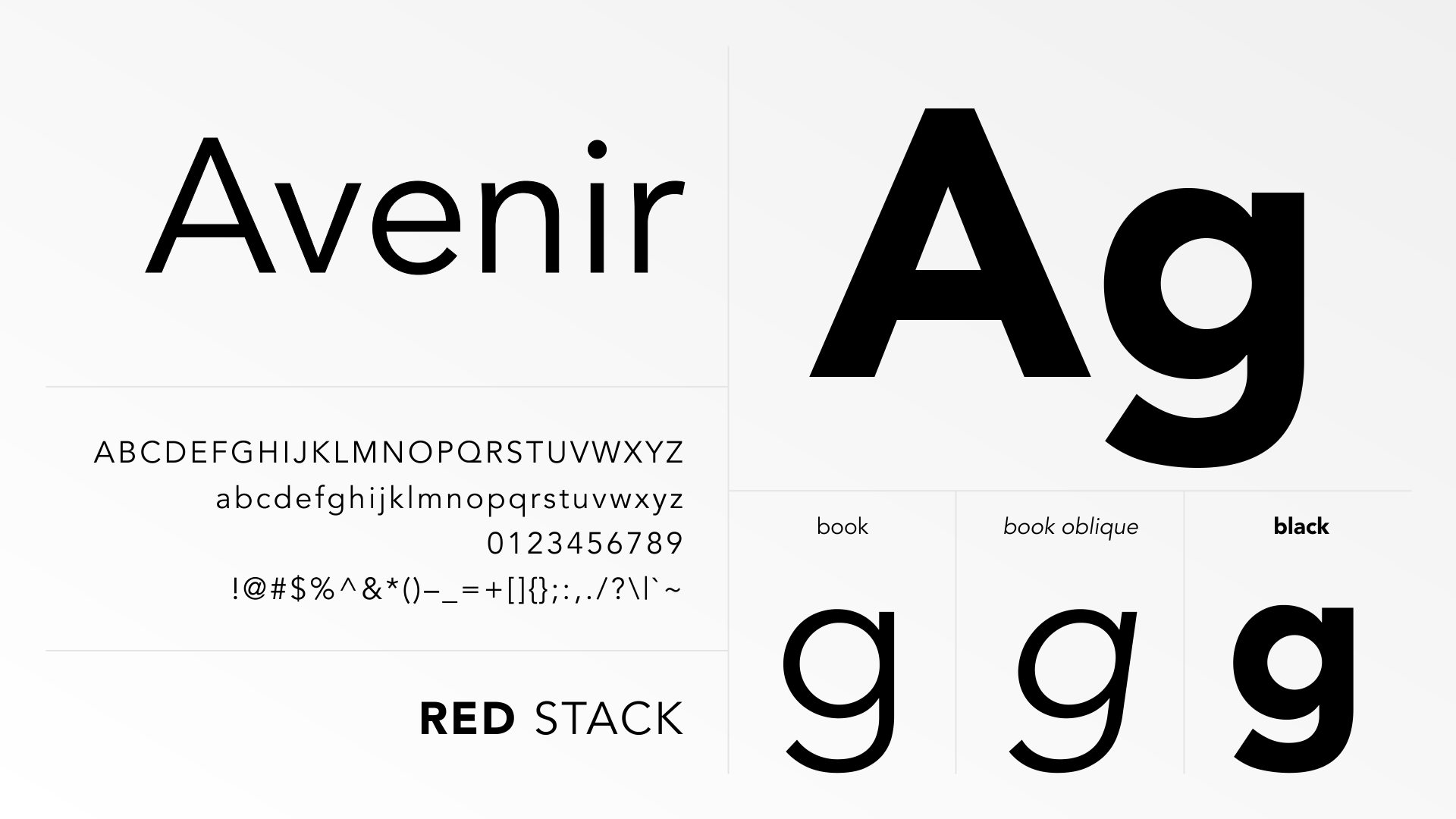
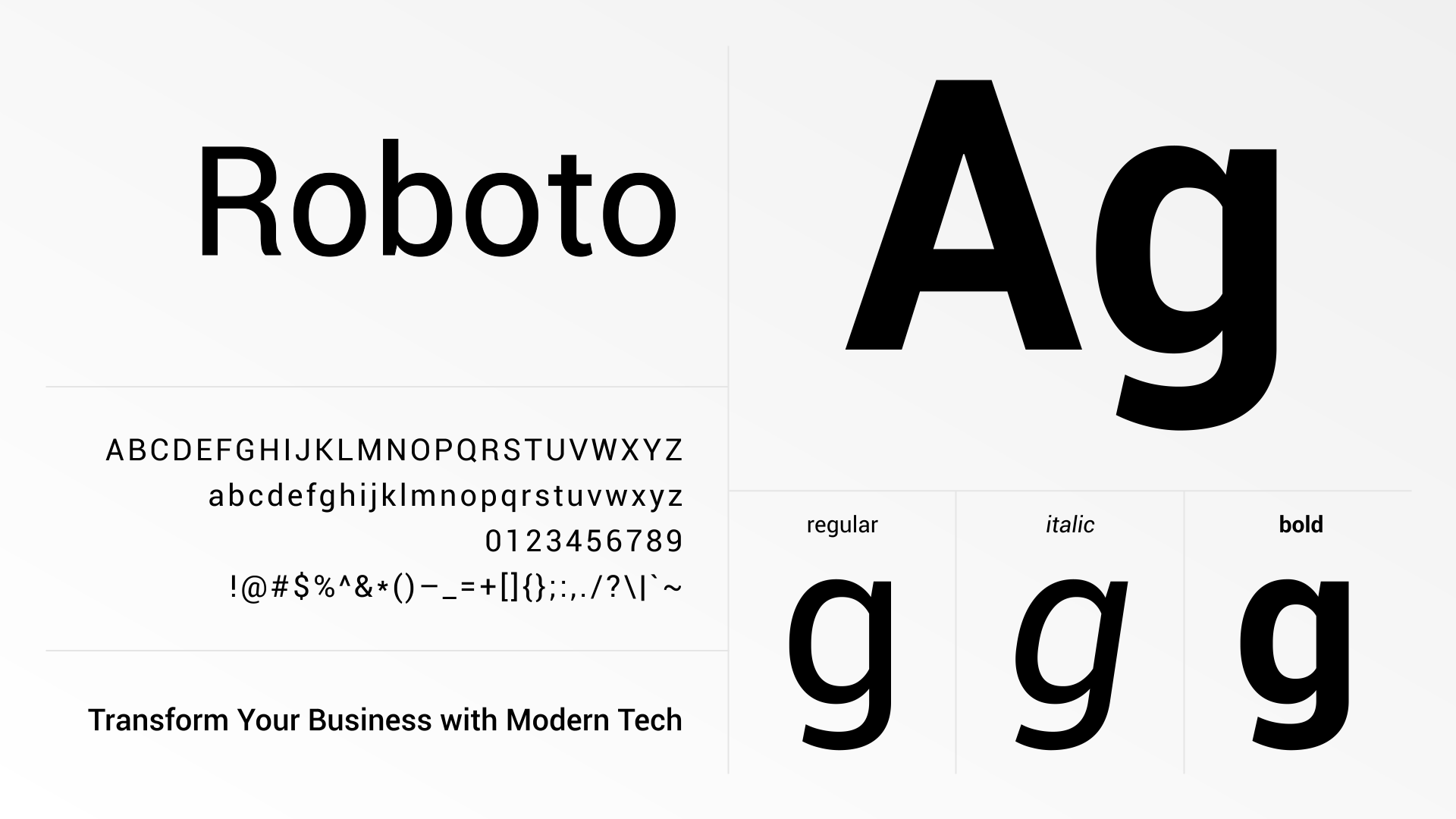
Typography & Color Scheme
This modular design system ensured that as RedStack evolved -from offensive attack simulations to complex SOC2 compliance tools -the interface remained intuitive and professional.


From zero to launch-ready
The engagement delivered a complete product design foundation — enabling CyberWerkx to launch RedStack with confidence and positioning the company for sustainable product growth.
- RedStack MVP launched – CyberWerkx’s first product, built on the design foundation delivered in this engagement
- Design system established from scratch – full component library, typography, colour, and interaction patterns – enabling rapid development without design bottlenecks
- Developer documentation delivered – comprehensive guidelines allowing the engineering team to extend the system independently
- Dual-audience UX resolved — a single interface credibly serving both security experts and new learners through progressive disclosure and contextual complexity
- Set a new standard for how CyberWerkx approaches product development – the design system became the foundation for all subsequent services
Want to see how it was built?
The process page covers the full research methodology, six design phases, design system architecture, and what I’d do differently – with diagrams for each stage.


